FAMat checkoutWeRead 10x faster without missing key points
Instant TLDR, table of contents, and smart notes for every article.
Chrome extension. Free to start.
Reading online is broken
Articles are getting longer
Average read time is 12+ minutes. You don't have time to read everything.
No way to jump to what matters
Endless scrolling to find the key insights buried in the middle.
Notes get scattered across tools
Copy-pasting into Notion, losing context, forgetting what you read.
WeRead gives you the highlights in 3-5 seconds
Click "Analyze" on any article. Get instant summaries, table of contents, and take notes—all in one sidebar.
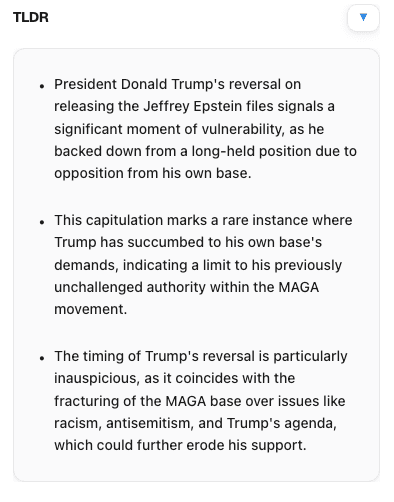
TLDR in seconds
3-5 bullet summary of any article. Know if it's worth your time before scrolling.
- → Key points extracted
- → Works on blogs, news, research papers
- → Runs in 3-5 seconds
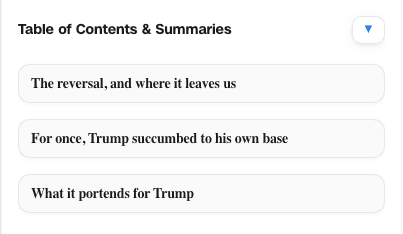
Auto table of contents
Jump to any section instantly. No more endless scrolling.
- → All headings mapped
- → One-click navigation
- → Section summaries included
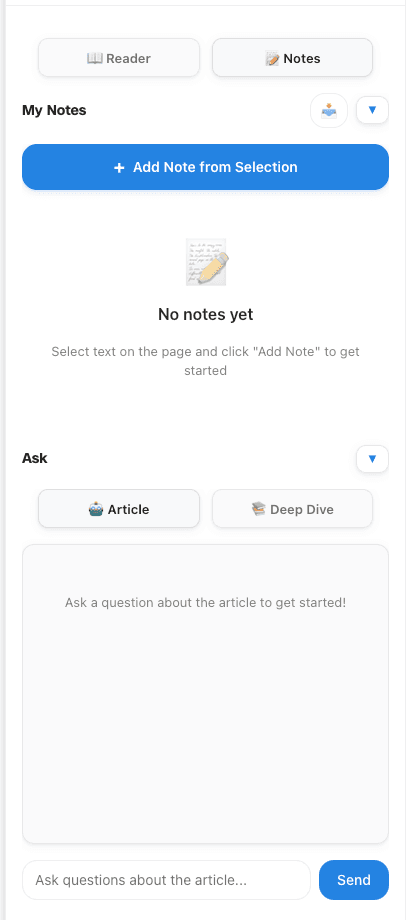
Smart notes that stick
Highlight text, add notes, export to PDF. All saved per-URL, stays on your device.
- → Notes anchored to paragraphs
- → PDF export with timestamps
- → Private by default
Chrome Web Store
4.8 ★ rating
Setup time
Under 30 seconds
Avg. time saved
12 min/article
Security
Notes stay local
"WeRead is the fastest way I have found to brief dense research. The TLDR + notes export removes hours of prep every week."
Changelog
What's new in WeRead
Latest updates to Warm Up, navigation, performance, and shortcuts.
UI/UX Improvements
New- Warm Up tab - Key Terms, Key Concepts, Reading Strategy sections
- Warm Up as default tab - Opens first instead of Reader
- Draggable panel - Drag by header to reposition
- Resizable panel - Drag left edge to resize (300-800px)
- Smart popup button - Shows "Show Panel" if already analyzed, "Analyze This Page" if not
- Fixed collapse bug - White area no longer stays visible when collapsed
Navigation
New- Clickable key terms - Click any term to jump to its first occurrence on the page
- Golden highlight animation - Found terms pulse and highlight for 3 seconds
- Simplified Table of Contents - Removed summaries, kept clickable TOC links
Performance
New- Analysis caching - Results saved for 24 hours, instant load on return visits
- Refresh button - Force re-analyze when needed
- Auto-hide cache indicator - Shows "Loaded instantly" then fades after 5 seconds
Shortcuts
New- Ctrl+P / Cmd+P - Toggle panel open/closed
Pricing
Flexible plans, same quality.
Modeled after usemomo’s clean, high-contrast layout.
Free
$0
10 analyses / month
Install and start summarizing a handful of articles each week.
- TLDR + TOC + Section summaries
- Reader and Notes tabs
- AI chat (Article & Deep Dive)
- PDF export and dark mode
Pro
$2.99
Unlimited analyses
For researchers, students, and teams who live inside long-form content.
- Everything in Free plan
- Priority processing + support
- Early access to new modes
- 30-day money-back guarantee
Start reading faster today
Free forever. 10 analyses per month. No credit card required.
Upgrade to Pro ($2.99/mo) for unlimited analyses. Cancel anytime.